A resident quick-note app for macOS
Notes without
the ceremony.
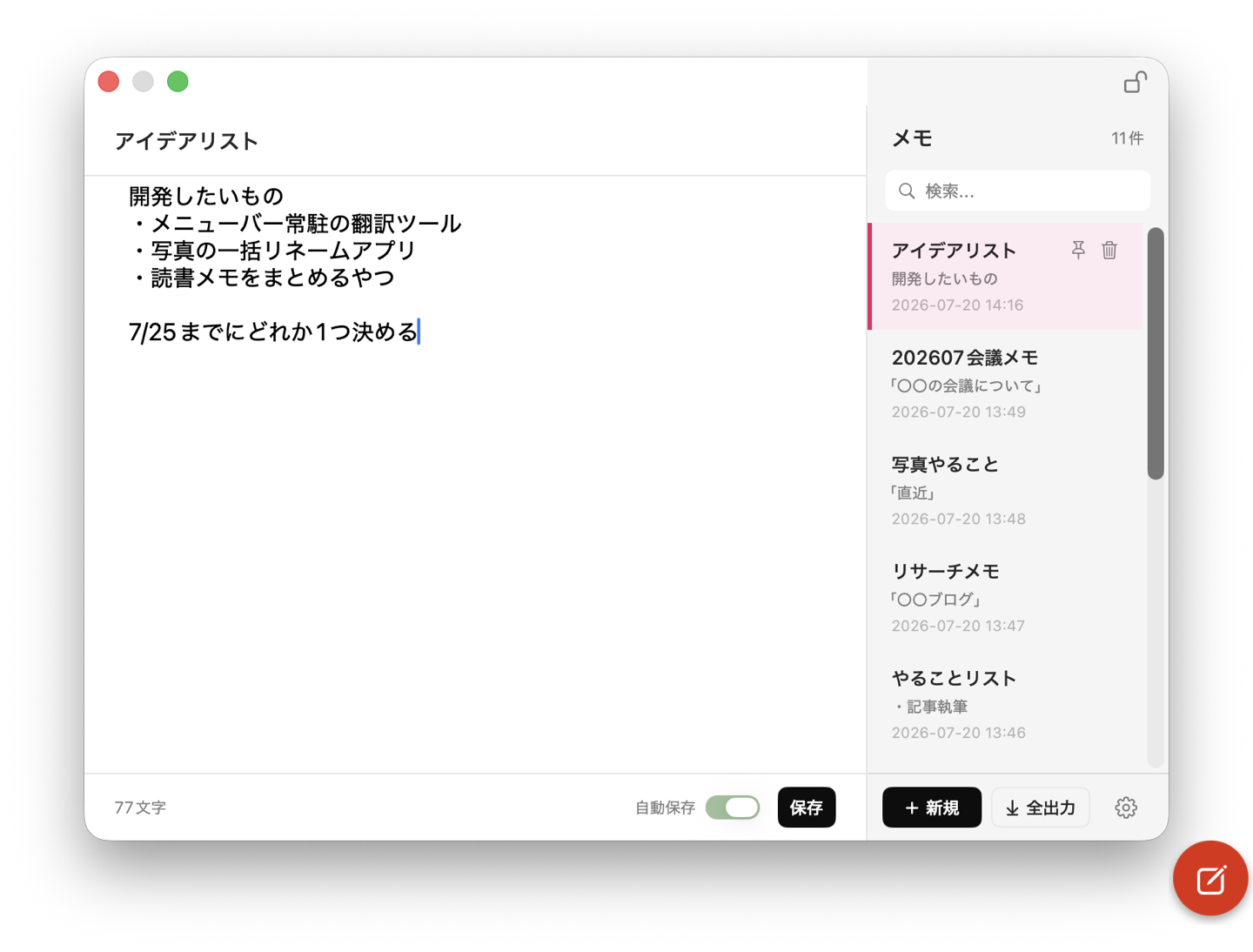
Mid-video, mid-code, a thought shows up. You go hunting for a notes app, open it, and lose your place — we removed that round trip. The floating button, or ⌃⌥M. Write, close. That's it.
$3.99 one-time
No ads. No subscription.
Apple Notes is too much.
Stickies is too little.
We built the in-between.
Opening a full-blown notes app just to jot something down is a ceremony. Leaving sticky notes plastered on your screen isn't right either. tempmemo lives in your menu bar, appears for the moment you need it, and gets out of the way.
| tempmemo | Apple Notes | Stickies | |
|---|---|---|---|
| Never steals focus from your current app | ◯ | — | — |
| Opens anywhere from a floating button | ◯ | — | — |
| Search across titles and body text | ◯ | ◯ | — |
| Trash with 30-day recovery | ◯ | ◯ | — |
| Doesn't sit on your screen all day | ◯ | ◯ | — |
Apple Notes' Quick Note (hot corner / Fn+Q) is fast too — but it moves focus to the Notes app. tempmemo lets you write while your current app stays active. That's the difference.
How it works
Before the thought slips away.
Open
Click the floating pencil button, or press ⌃⌥M. The panel unfolds right where you are.
Write
Just type. Everything auto-saves. Leave the title empty and one is generated for you.
Close
Click anywhere else and it's gone — or press Esc. Empty notes clean themselves up.
Features
Fewer features, built properly.
Never steals focus
The panel doesn't take the active state away from the app you're working in. Take notes during a video, a call, or a coding session — without breaking your flow.
0
Times your work gets interrupted for a note
Keyboard all the way
⌃⌥M to open, ⌘F to search, ↑↓ to pick a note, Esc to close. Esc during IME composition cancels the conversion, not the panel. No mouse required.
Keep what matters, toss the rest
Pin important notes to keep them on top. Scratch notes are fine to abandon — empty ones clean themselves up, and deleted notes stay recoverable for 30 days.
Make it yours
Six accent themes, ten button colors, eight icons, any size. Drag the button anywhere. Don't want it? Turn it off and use the hotkey and menu bar only.
Light enough to forget it's running
Not an Electron app. tempmemo is native SwiftUI, using roughly 18 MB of memory in practice. Keep it running all day — your Mac won't notice.
18MB
Your words stay in your hands
Auto-save, daily automatic backups, one-click manual backup and restore, and export to txt / md. Your data is always yours to take.
Privacy
Your notes never leave your Mac.
Zero network
The app performs no network communication at all.
Data Not Collected
That's our App Store privacy label — literally.
No ads, no tracking
No analytics SDKs. No ad SDKs. Nothing.
No account
No sign-up, no login. Launch it and write.
Price
$3.99
One-time. That's it.
No subscription. No in-app purchases.
The price of a cup of coffee. Yours for good.
FAQ
Is there a free trial?
No — the price is low enough to just try it. After purchase, you can request a refund through Apple (approval is at Apple's discretion).
What are the system requirements?
macOS 14.0 (Sonoma) or later. Runs natively on both Apple Silicon and Intel Macs.
Where are my notes stored?
Only on your Mac, in the app's sandboxed container. Nothing is ever sent to any server. You can see the exact storage path in the app's settings.
Is there an iPhone version or iCloud sync?
tempmemo is Mac-only for now. An iPhone version and iCloud sync are on the list of future candidates.
Won't the floating button get in my way?
You can drag it anywhere and change its size and color. If you'd rather not see it, turn it off in Settings and use the hotkey (⌃⌥M) and menu bar instead.
Maker
Who's behind this
tempmemo is built by a solo developer in Japan. It started as a personal tool — I didn't want to open a full-blown notes app just to jot something down. This isn't a ship-and-forget product; it's a tool I use every day and intend to keep improving.
Release updates will be posted on X (Twitter).